Free Online Counter
& Tally Counter App
Need to keep track of numbers? Our digital counter makes it easy to count anything, anywhere.
Whether you're tracking attendance, inventory, exercises, or research data, our Tally counter app works on any device with a simple tap. No more losing count or struggling with manual tally marks!
Quick Answer
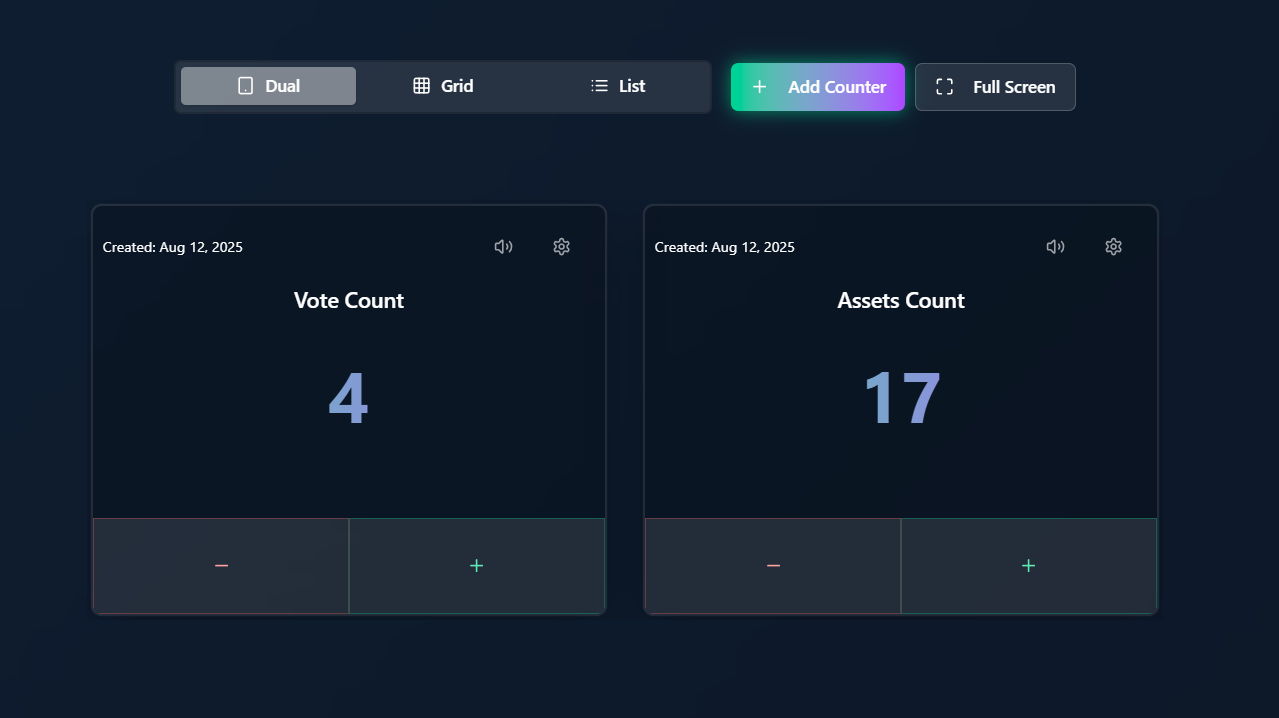
Tally Counter App is a free online tally counter that lets you count clicks, people, reps, attendance, inventory, anything you need to track. It supports unlimited labeled counters that you can view side-by-side (Dual), in a Grid, or as a List. Works offline, persists between sessions, no signup required, no usage cap, no watermarks. Used by sports trainers tracking reps, teachers logging attendance, researchers counting species, retail managers monitoring foot traffic, and hobbyists from birders to bartenders. Free forever, supported by minimal display ads.
Tally Counter App vs Other Counting Options
How Tally Counter App stacks up against physical clickers, mobile counter apps, and other free counter websites. Want a head-to-head instead? Compare against Simple Counter →
| Feature | Tally Counter App | Physical Clicker | iOS Tally Apps | Free Counter Sites |
|---|---|---|---|---|
| 100% free, no usage cap | ✓ | N/A ($5-30) | Freemium | Most |
| No signup required | ✓ | N/A | Often required | Varies |
| Multiple labeled counters at once | ✓ | Single only | Some | Rare |
| Auto-saves counts in your browser | ✓ | , | On-device | Varies |
| Works offline | ✓ | ✓ | ✓ | , |
| Full-screen focus mode | ✓ | , | Some | Rare |
| No app install (browser-only) | ✓ | N/A | Install required | ✓ |
| Undo button | ✓ | , | Some | Rare |
Based on publicly listed features as of June 2026. Specific apps and websites may have changed since publication.
A Tally Mark Counter That Never Loses Count
The old way of keeping a tally, four vertical marks and a diagonal slash for every fifth (groups of 5), works until your pen runs out or you lose your place. This online tally mark counter does the same job in your browser: tap to add one, and it tracks the total for you, in groups of five, with no paper and no miscounts.
Counts in fives, like real tally marks
Every tap is one mark. The running total updates instantly, so you get the speed of pen-and-paper tally marks without recounting the bundles at the end.
Multiple tally marks at once
Keep a separate labeled tally for each category, yes/no, by color, by aisle, by species, and watch them side by side. No more cramped columns in a notebook margin.
Nothing to lose, nothing to install
Your tally marks save automatically in the browser and survive a refresh. No app, no signup, works offline, open the page and start marking.
Whether you call it a tally mark counter, a tally marks app, or just an online tally counter, it's the same idea made faster: counting things one mark at a time, accurately, every time. See tally marks vs. a digital counter →
A Click Counter and Number Counter in One
People call this tool different things, a click counter, a clicker counter, a number counter, a tick counter, a button counter. They all describe the same job: press once, the number goes up by one. This is that tool, online and free, with as many separate counters as you need.
A clicker without the hardware
A handheld clicker costs money, counts one thing, and jams at 9999. This online clicker counter runs in the browser, never jams, has no ceiling on the number, and lets you undo a mis-click instead of starting over.
A number counter that keeps its place
Count up or count down, from zero or from any starting number. The count saves in your browser, so closing the tab or locking your phone doesn't reset it.
Click by keyboard or by tap
Space or Enter to count on a laptop, a full-width tap target on a phone. Fast enough to keep up when things move quickly and you can't look down.
Built for whatever you're counting, whether that's people through a door, dhikr on a digital tasbih, or points in a game.
Why Our Counters Are Better
No account, no upgrade, no counter limit, unlike most other free online counters. Designed for precision and flexibility in every counting scenario.
Unlimited Counters
Create as many labeled counters as you need, with no cap on how many or how high they count. No account, sign-in, or paid plan required to unlock it.
Saves Automatically
Every count is saved automatically in your browser's local storage, so your tallies are still there when you come back on that device.
Offline Mode
Works without internet. Your counts save locally in your browser.
Say Goodbye to Manual Tally Marks Forever
Remember struggling with paper tally marks and losing count? Those days are over. Our digital tally marker gives you:
Perfect accuracy every time you count
No more lost data with automatic saving
Quick counting with a simple tap interface
Easy organization with labeled counters
Instant statistics to analyze your counts
The Tally counter function is intuitive enough for anyone to use without training. Just tap and count!
Perfect For Any Counting Need
The tally counter that adapts to your specific requirements
Sports & Fitness
Count reps, track scores, monitor player stats with quick-tap interface
Education
Track participation, behavior points, or attendance across classes
Research
Field observations, surveys, and data collection with multiple labeled counters
Retail & Events
Monitor foot traffic, inventory, or attendance in real-time
How to Use
Create Counters
Add as many counters as you need, and give each one a meaningful name.
Customize
Set starting values, adjust views, and personalize your counting experience.
Focus Mode
Use full-screen mode for distraction-free counting when you need to focus.
Common Questions About Our Counter App
Do I need to create an account?
No. There is no account, signup, or login. Just open the app and start counting. Your counts save automatically in your browser's local storage on that device.
Can I use it on my phone and computer?
Yes! Our online counter works on any device with a web browser. Note that counts are saved locally in each browser, so there is no automatic sync between devices, each device keeps its own counts.
How do I reset my counters?
Simply tap the reset button on any counter. Don’t worry about mistakes - there’s an undo button too!
Can I share my counts with others?
There is no shared or multi-user counter, counts live only in your own browser. For team counting, each person counts on their own device and you combine the totals manually.
Is this a tally counter, digital counter, or number counter?
All of the above. Tally counter, digital counter, click counter, tap counter, number counter, that all refer to the same kind of tool here: tap to add one to the count, tap undo to correct a mistake. Use it for reps, headcounts, votes, inventory, or anything else you count by hand.
Ready to Start Counting?
No more messy tally marks or losing track of important numbers. Our digital counter is waiting for you!